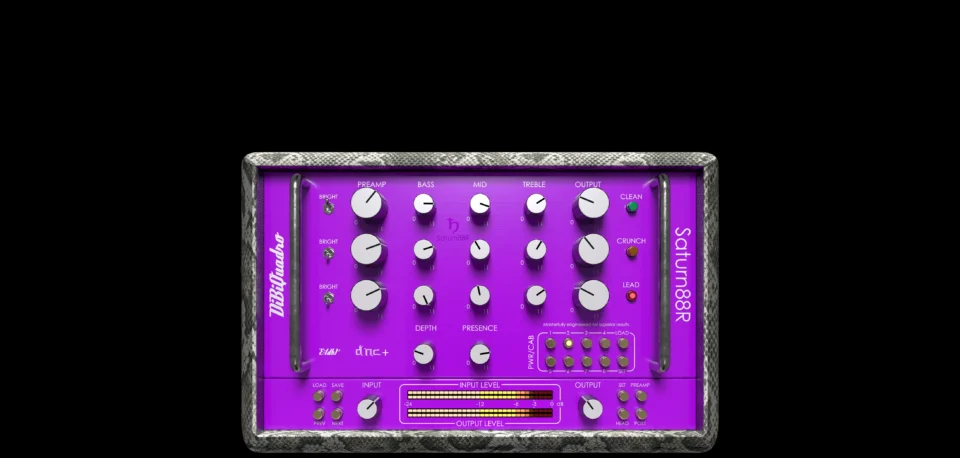
Saturn88R
€119.00
- Description
Description
VST3 – AU – AAX

€119.00
Three Channels Excellence
Saturn88R captures in a software plugin the unmistakable tone, touch, and power of one of the most legendary rack preamps in rock and metal history. This three-channel powerhouse is built for players who demand pristine cleans, crushing rhythm tones, and searing leads, all within a single, meticulously engineered unit.
Clean Channel – Sparkling Precision
Pure, glassy cleans with remarkable headroom and a percussive attack that lets every note shine. Whether you’re dialing in lush, ambient textures or tight, funky grooves, this channel delivers a crisp, full-bodied response that never gets lost in the mix.
Crunch Channel – Thick and Articulate
A beautifully voiced, mid-forward overdrive with tight lows and rich, harmonically complex mids. Perfect for everything from classic rock crunch to biting blues leads, this channel brings the organic feel and dynamic punch that defines iconic rock tones.
Lead Channel – High-Gain Glory
Blistering saturation with rich harmonic overtones, fluid sustain, and a fierce, cutting edge that commands attention. This channel is voiced to deliver solos that slice through the mix with precision and authority, yet remain touch-sensitive and articulate.
Each channel has been tuned with an ear for authenticity, offering a vast tonal palette that covers everything from the warm, shimmering cleans of vintage tube circuits to the aggressive, high-gain fury that defined an era of rock and metal. With its flexible EQ and nuanced gain structure, the Saturn88R gives you the power to shape your sound with absolute control.
This isn’t just a preamp – it’s the core of your tone, designed for those who refuse to compromise.
Non-Plus-Ultra Preamp
Non-Plus-Ultra Preamp represents the perfect approach to circuit modeling. Saturn88R preamp features a built-from-scratch 64-bit engine which is based on general purpose hi-quality algorithms and the most recent non-linear models. Special care has been taken in defining the Non-Linear Solver to ensure maximum quality and realism, without losing details in favor of performances (Double-Precision Non-Linear Computing).
Our Non-Plus-Ultra reproductions bring a completely new philosophy to the table: being able to shape your tone by giving total access to the circuit components. Managing each gain stage level, shaping the tone-stacks or modifying the tubes characteristics: there is virtually no limit to what you can achieve with our plugins!
Power Amp Distortion & Headroom
The HEADROOM section lets you shape the behavior of the power stage, from clean headroom to full saturation.
You can define how and when the power amp starts to distort, choose different clipping characters, and adjust the interaction between pre and post gain stages.
Pwr/Cabs: Non-Linear Convolution
Before describing our solution, let’s talk about what everyone else does: the commonly spread approach of the “single IR” to reproduce a cabinet is nothing more than a digital clean equalizer. Which means: non-linearities are not reproduced at all. Competitors generally model power amps to introduce harmonic distortion, but they totally omit the non-linearities coming from the speaker, the microphone and the mic preamp. While these can be considered somehow negligible for some types of high wattage speakers when dealing high gain sounds, it is essential when the speaker breaks up. Furthermore, sometimes solid state power amps are used to sample cabinet, speakers and mikes, but these power amps, despite being considered “neutral”, have their own “footprints” due to the different impedance, so the interaction with the speaker is noticeably different when compared to a classic tube power-amp.
Another limit of many well-known amp simulations is the complete absence of power amp clipping.
As DiBiQuadro we implemented our own version of Non-Linear Convolution (NLC) to reproduce all the final stages of a miked amplifier. We use to call Pwr/Cab a chain made of:
- a tube power amp
- a cabinet/speaker
- a microphone
- and a high-end studio preamp

Double-Precision Non-Linear Computing and Convolution
Pwr/Cabs List
Saturn88R_000_100W_5881
Saturn88R_001_100W_5881_60A_1_T75_57_A12C
Saturn88R_002_100W_5881_60A_1_T75_201_A12C
Saturn88R_003_100W_5881_60A_1_T75_421_A12C
Saturn88R_004_100W_5881_60A_4_T75_57_A12C
Saturn88R_005_100W_5881_60A_4_T75_201_A12C
Saturn88R_006_100W_5881_60A_4_T75_421_A12C
Saturn88R_007_100W_5881_60A_2_V30_57_A12C
Saturn88R_008_100W_5881_60A_2_V30_201_A12C
Saturn88R_009_100W_5881_60A_2_V30_421_A12C
Saturn88R_010_100W_5881_60A_3_V30_57_A12C_A
Saturn88R_011_100W_5881_60A_3_V30_201_A12C_A
Saturn88R_012_100W_5881_60A_3_V30_421_A12C_A
Saturn88R_013_100W_5881_60A_3_V30_57_A12C_B
Saturn88R_014_100W_5881_60A_3_V30_201_A12C_B
Saturn88R_015_100W_5881_60A_3_V30_421_A12C_B
Saturn88R_016_100W_5881_60B_1_M25_57_B73
Saturn88R_017_100W_5881_60B_1_M25_201_B73
Saturn88R_018_100W_5881_60B_1_M25_421_B73
Saturn88R_019_100W_5881_60B_3_M25_57_B73
Saturn88R_020_100W_5881_60B_3_M25_201_B73
Saturn88R_021_100W_5881_60B_3_M25_421_B73
Saturn88R_022_100W_5881_60B_2_H30_57_B73
Saturn88R_023_100W_5881_60B_2_H30_201_B73
Saturn88R_024_100W_5881_60B_2_H30_421_B73
Shaper
The input signal can be processed by activating a shaper before the preamp. This block allows to select one of the following:
- a Low Cut
- a Mid Boost
- a Graphic Equalizer
- a Parametric Equalizer
- a Compressor
- an Overdrive circuit
- a Distortion circuit
Wah, Overdrive & Distortion — Fully Tweakable!
All DiBiQuadro amp simulations include the following effects, fully tweakable at component level:
- A beautifully voiced Wah effect. The frequency parameter can also be automated via your DAW.
- An Overdrive with two modes: TS (symmetric clipping) and SD (asymmetric clipping).
- A Distortion with three modes: MDP (Distortion+ style), and 250/308 (Classic Preamp) modes.
Both Overdrive and Distortion allow to select the type of diode:
- Silicon
- Germanium
The diode characteristic and topology (only positive, only negative, one against one) can also be modified.
Automations
Every knob, button and state of the Preamp and PwrCab sections can be automated in your DAW. This provides a new level of integration of DiBiQuadro plugins with the time-based events of your project.
Audio Samples
We pour our passion into achieving the perfect representation of the hardware. Don’t just take our word for it—let your ears be the judge.
Reverb and delay are not included in the product. They are used for demonstration purposes only.
Saturn88R Clean
Saturn88R Clean + Rev
Saturn88R Crunch
Saturn88R Crunch + Rev
Saturn88R Crunch Pushed
Saturn88R Crunch Pushed + Rev
Saturn88R Crunch Warmer
Saturn88R Crunch Warmer + Rev
Saturn88R Crunch Warmer Pushed
Saturn88R Crunch Warmer Pushed + Rev
Saturn88R Lead Rhy
Saturn88R Lead Rhy Stereo
Saturn88R Lead R34 5k Solo
Saturn88R Lead R34 5k Solo + Rev + Delay
Saturn88R Lead + SL Solo
Saturn88R Lead + SL Solo + Rev + Delay
Standalone Application
In addition to using it as a plugin in your favorite DAW, you can also run it as a standalone application and play in real time directly from your operating system, with no DAW required.
The Renderer
The Renderer is another standalone application to process an input wave file in OffLine mode. It can be invoked via command line too. Its purpose is to render long and processing demanding configurations (e.g. high upsampling).
System Requirements
Saturn88R is distributed for Windows 64-bit and MacOs 64-bit Intel and Arm (Apple Silicon), in 2 formats:
- Plugin in VST3/AU/AAX 64 bit format;
- Renderer in Windows/macOs executable
We recommend to demo the 15-days trial version before any purchase. Requirements are reported in the tables below.
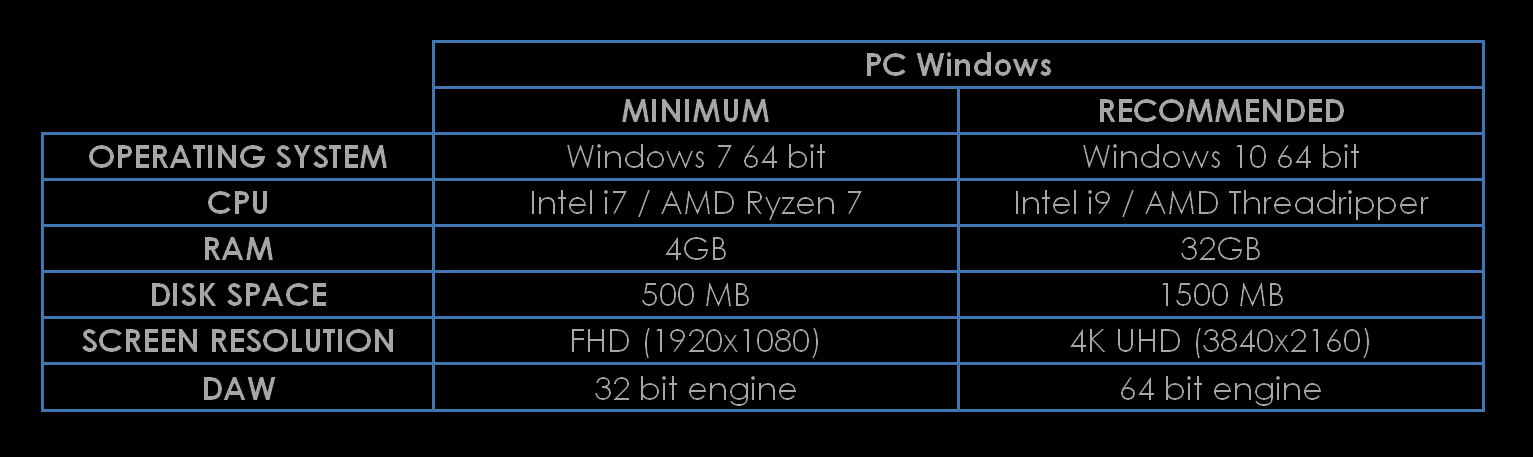
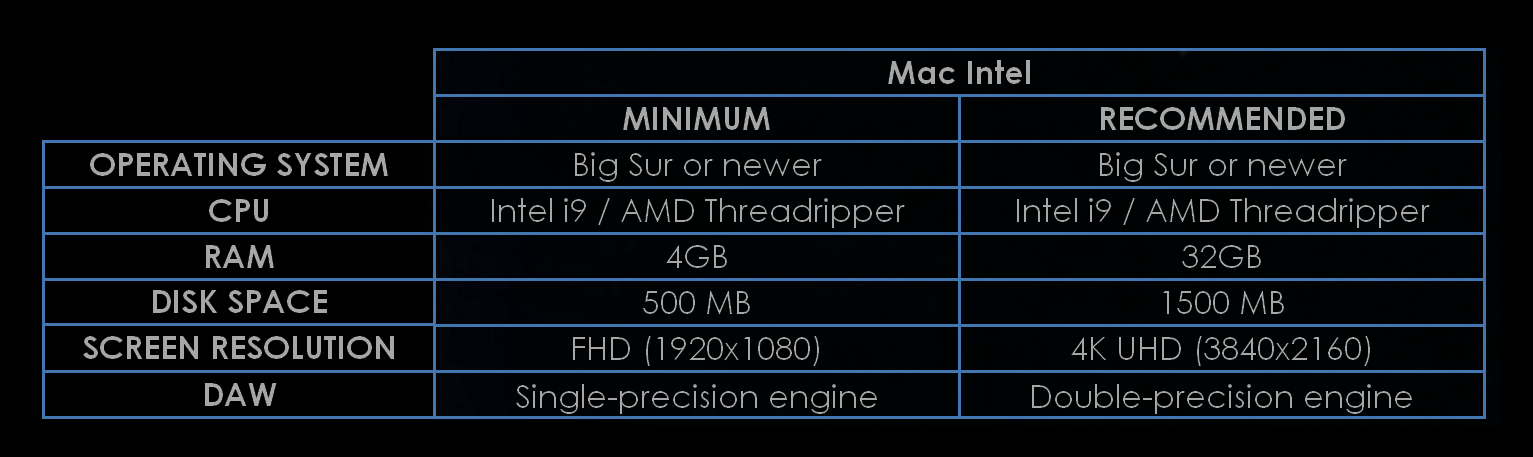
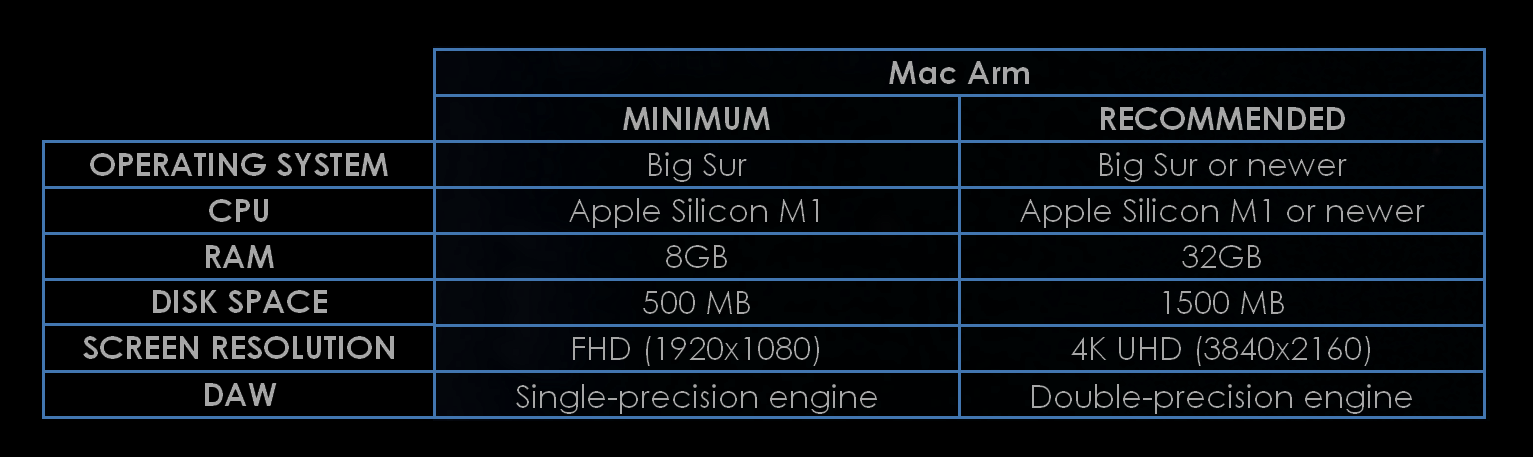
Formats and operating systems different from the ones specified above are not supported yet.
DAW compatibility
Saturn88R can be used on the most popular DAWs (digital audio workstation). Here is a list of tested DAWs:
- Cockos Reaper (Windows/macOs)
- Presonus Studio One (Windows/macOs)
- Steinberg Cubase/Nuendo (Windows/macOs)
- Logic Pro X (macOs)
- Cakewalk Bandlab/Sonar (Windows)
- Avid Pro Tools (Windows/macOs)
- Ableton Live (Windows/macOs)
For Ableton Live on Windows 11 the following action is necessary to display the GUI correctly: right click the Live executable (or shortcut) / Properties / Compatibility / Change high DPI settings / Check “Override high DPI scaling behavior. Scaling performed by:” / change drop down to “Application” / Apply.
In Ableton Live, right-click the plug-in in the browser and disable Auto-Scale Plug-In Window.
Downloads
To install/authorize Saturn88R please use DiBiQuadro Center. If you have any issue please contact us.